Gill SDK
Lightweight SDK based on @solana/kit, simplifying RPC calls and transaction construction
Gill SDK
Gill is an SDK tool developed based on @solana/kit, which can run in any js environment such as NodeJS and browsers. So for front-end programmers, developing web Solana programs can choose web3.js, @solana/kit, or gill. Web3.js is the first generation and the most widely used, gill is the latest and is still in the early stages. It's your choice.
NodeJS
This article discusses running gill programs in NodeJS. The code is taken from the official website and has been verified by running.
Create Token
import { createTransaction, getSignatureFromTransaction, signTransactionMessageWithSigners, createSolanaClient, generateKeyPairSigner, getMinimumBalanceForRentExemption, getExplorerLink } from "gill";
import { getMintSize, getCreateAccountInstruction, getInitializeMintInstruction, getCreateMetadataAccountV3Instruction } from "gill/programs";

// import { type KeyPairSigner } from "gill";
import { loadKeypairSignerFromFile } from "gill/node";
import { TOKEN_PROGRAM_ADDRESS, getTokenMetadataAddress } from "gill/programs";
// import { TOKEN_2022_PROGRAM_ADDRESS } from "gill/programs";

// const tokenProgram = TOKEN_2022_PROGRAM_ADDRESS;
const tokenProgram = TOKEN_PROGRAM_ADDRESS;
// This defaults to the file path used by the Solana CLI: `~/.config/solana/id.json`

const signer = await loadKeypairSignerFromFile();
console.log("signer:", signer.address);
const { rpc, sendAndConfirmTransaction } = createSolanaClient({
    urlOrMoniker: "devnet", // `mainnet`, `localnet`, etc
});
const space = getMintSize();
const mint = await generateKeyPairSigner();
const metadataAddress = await getTokenMetadataAddress(mint);

const { value: latestBlockhash } = await rpc.getLatestBlockhash().send();
const transaction = createTransaction({
    feePayer: signer,
    version: "legacy",
    instructions: [
        getCreateAccountInstruction({
            space,
            lamports: getMinimumBalanceForRentExemption(space),
            newAccount: mint,
            payer: signer,
            programAddress: tokenProgram,
        }),
        getInitializeMintInstruction(
            {
                mint: mint.address,
                mintAuthority: signer.address,
                freezeAuthority: signer.address,
                decimals: 9,
            },
            {
                programAddress: tokenProgram,
            },
        ),
        getCreateMetadataAccountV3Instruction({
            collectionDetails: null,
            isMutable: true,
            updateAuthority: signer,
            mint: mint.address,
            metadata: metadataAddress,
            mintAuthority: signer,
            payer: signer,
            data: {
                sellerFeeBasisPoints: 0,
                collection: null,
                creators: null,
                uses: null,
                name: "super sweet token",
                symbol: "SST",
                uri: "https://img.makecoin.cc/makecoin/metadata2.json",
            },
        }),
    ],
    latestBlockhash,
});


const signedTransaction = await signTransactionMessageWithSigners(transaction);

signedTransaction && console.log(
    "Explorer:",
    getExplorerLink({
        cluster: "devnet",
        transaction: getSignatureFromTransaction(signedTransaction),
    }),
);
signedTransaction && await sendAndConfirmTransaction(signedTransaction);
The content of https://img.makecoin.cc/makecoin/metadata2.json is as follows:
{
    "name": "OPOS",
    "symbol": "OPOS",
    "description": "Only Possible On Solana",
    "image": "https://img.makecoin.cc/1inch.png",
    "attributes": [
      {
        "trait_type": "Item",
        "value": "Climate"
      }
    ]
  }
Name and Symbol
As an experiment, different names and symbols were specified in the code and json respectively. Let's see what we finally see in the wallet and browser.
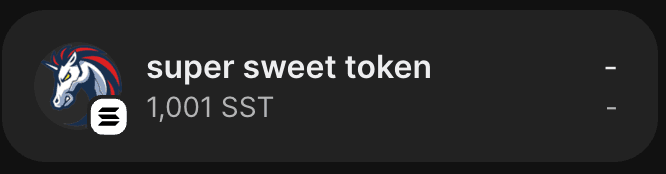
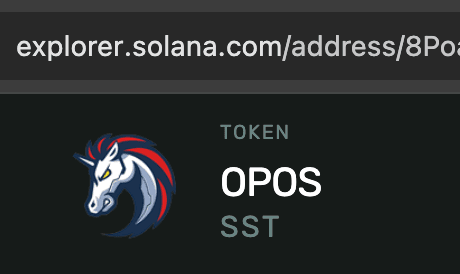
Whether in the wallet or browser, the symbol uses the value from the code, while the name uses the value from the code in the wallet, but the browser uses the value from the json. This is just an experiment. Generally, we use the same name and symbol in both code and json.